
Rubrics are off until you turn one on
Where to find this: Activities › open an activity › Evaluation › Rubric
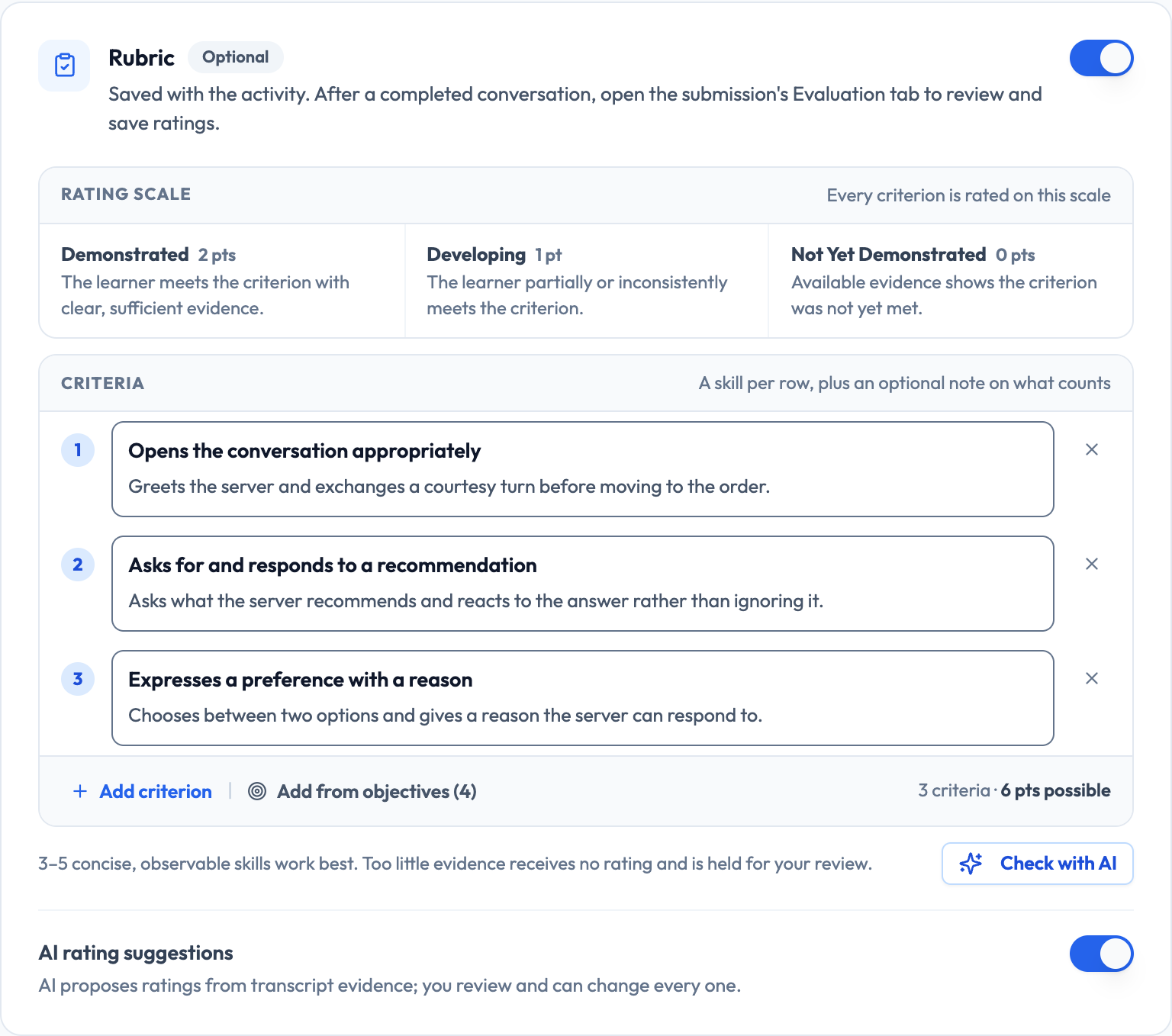
Every activity has a rubric available on the Evaluation step, and it's disabled by default. Turning it on gives you structured criteria that get evaluated per submission, which is what makes grading a section consistent rather than impressionistic.

Lemon says: Enabling a rubric changes how you grade, not what students experience during the conversation.
Three levels, ready to use
The rubric ships with three achievement levels. They're deliberately coarse, because fine-grained scales are hard to apply consistently to a short spoken conversation.
- Demonstrated — the learner meets the criterion with clear, sufficient evidence
- Developing — the learner partially or inconsistently meets the criterion
- Not Yet Demonstrated — available evidence shows the criterion was not yet met
Lemon says: Three levels you apply consistently beat five levels you apply differently on a Friday afternoon.
Writing criteria that can actually be judged
You can define up to eight criteria per activity. The useful ones describe something observable in a transcript. The unhelpful ones describe an internal state or something that needs audio the evaluation can't weigh.
Hard to judge
Shows confidence in the target language.
Confidence isn't visible in a transcript, and two graders will read it completely differently.
Easy to judge
Asks at least two questions to gather information before making a choice.
Countable, present in the transcript, and unambiguous.
Also good
Uses past-tense forms to describe a completed event, with errors that do not obscure meaning.
Names the form and sets the accuracy bar in the same sentence.
Lemon says: Fewer criteria, better written. Four sharp criteria are worth more than eight vague ones.
AI-suggested versus manual scoring
Rubrics run in one of two modes. In AI-suggested mode you get proposed ratings per criterion that you review and adjust. In manual mode you rate everything yourself.
- AI-suggested — much faster across a section, and you keep the final say on every rating
- Manual — slower, appropriate when the stakes are high or the criteria are subtle
Lemon says: AI-suggested with a real review pass is the sweet spot for most classroom grading.
The three review states
Grading moves through three states, visible as Gradebook filters. The separation between saving and releasing is deliberate: it lets you grade a whole section over several sittings and then reveal everything at once.
- Needs review — work is waiting on you, including grading you've saved as a draft
- Reviewed — locked, but not yet visible to the student
- Released — the student can see it
Lemon says: Grade in draft, confirm every criterion before you move on, release the whole section together. Nobody compares notes early that way.
Grading a section end to end
A workable order for getting through a full section without losing consistency partway.
- Filter the Gradebook to Needs review
- Grade three or four submissions first to calibrate what Demonstrated means for this activity
- Work through the rest, adjusting AI-suggested ratings rather than starting from scratch
- Deal with any criteria flagged for review — those are where the evidence was thin
- Save a draft once every criterion is rated, then release the section in one action from the Gradebook column header
Lemon says: Calibrating on the first few is the trick. Standards drift if you don't anchor them early.
When a rubric isn't worth it
Rubrics add real overhead. For low-stakes practice they can cost more than they return, and leaving the rubric off while relying on the AI feedback report is a perfectly reasonable choice.
- Ungraded practice — leave the rubric off
- Participation credit — completion status in Student Work is enough
- Graded assessments — a rubric earns its keep
- Anything a student might contest — a rubric is the record you'll want
Lemon says: Use rubrics where the grade matters. Everywhere else, let students practice without being measured.