
Five decisions that change the whole feel of a conversation
Where to find this: Activities › open an activity › Scenario › Scaffolding during the conversation
The "Scaffolding during the conversation" card holds five settings that govern how the AI responds when things go sideways. They are the difference between an activity that feels supportive and one that feels like an exam — and between an activity that pushes students and one that lets them coast in English.
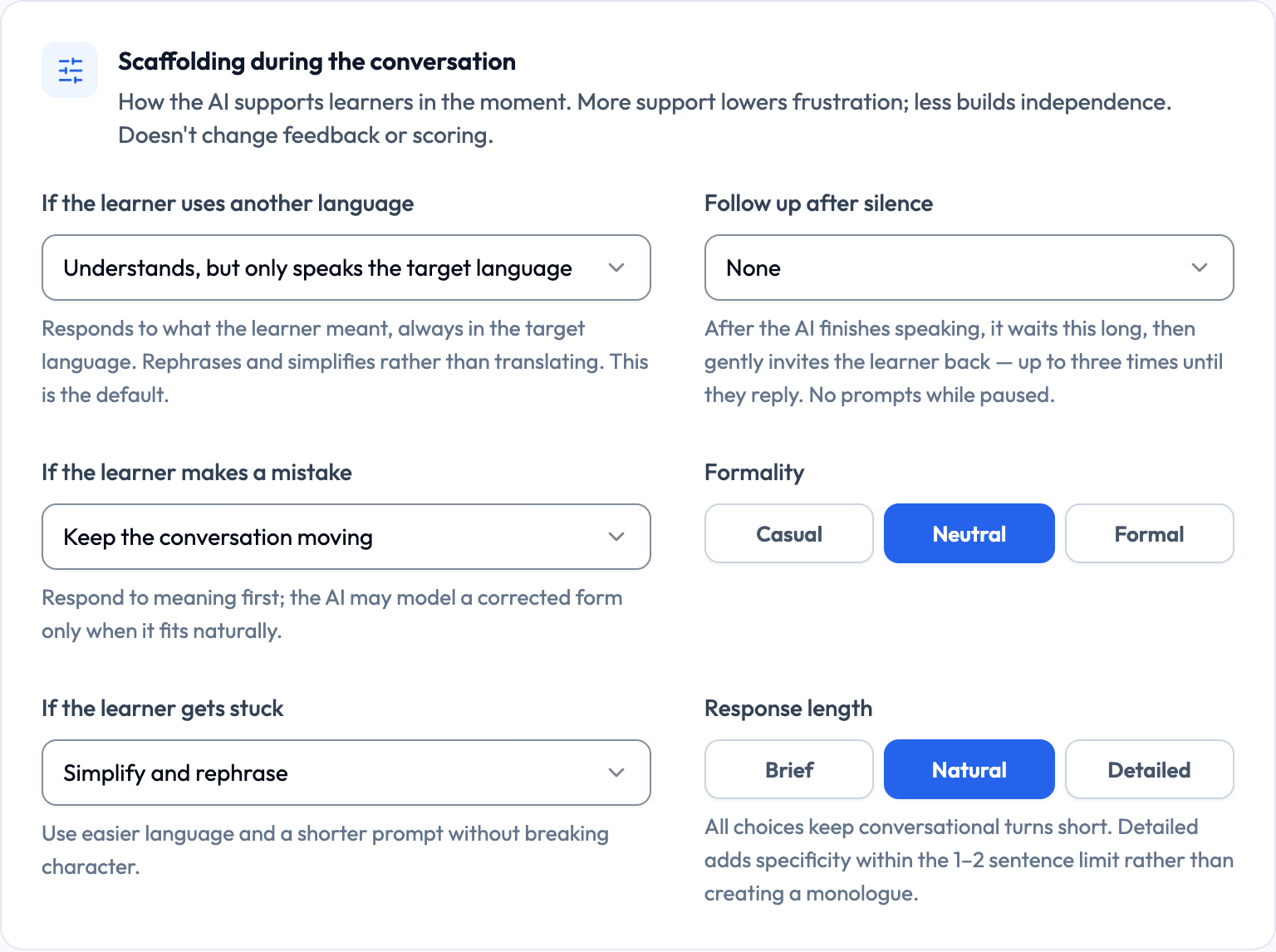
- What happens when the student uses another language
- How mistakes are handled
- How often corrections are modelled
- What help a stuck student gets
- Whether the AI follows up when the student goes quiet

Lemon says: These settings are where a beginner activity and an advanced activity really diverge. Same scenario, different settings, completely different task.
When the student switches to English
This is the setting instructors change most often, and the one with the biggest effect on how much target-language speaking actually happens. There are three options.
- Understands, but only speaks the target language — responds to what the student meant, always in the target language, rephrasing and simplifying rather than translating (this is the default)
- Explains in the learner’s language when they ask — the same, except that an explicit request for a meaning or translation gets one short explanation before returning to the target language
- Acts like it doesn't understand — stays in character and acts as though the other language isn't understood, asking the student to try again in the target language
Lemon says: 'Acts like it doesn't understand' is the immersion setting. It's brilliant with the right group and demoralising with the wrong one.
How mistakes are handled
Three options control what the AI does when a student makes an error. The right choice depends entirely on whether this activity is about fluency or accuracy.
- Keep the conversation moving — responds to meaning first, and may model a corrected form only when it fits naturally (the default)
- Recast naturally — models the correct form inside a natural reply, without stopping the conversation
- Correct briefly — gives a short in-character correction, then continues
Lemon says: Fluency day? Keep it moving. Accuracy day? Recast or correct. Trying to do both at once usually does neither well.
Recast frequency
When you choose "Recast naturally", a How often to recast control appears with three levels: Rarely, Sometimes, and Often. This is your volume knob — it decides how much correction a student actually experiences.
- Rarely — corrections only for errors that block understanding
- Sometimes — a balanced amount for most classroom activities
- Often — heavy modelling, suited to a focused accuracy drill
Lemon says: 'Often' with a low-confidence student can feel like being interrupted constantly. Try 'Sometimes' first and adjust after you've listened to a real session.
When a student freezes
Every instructor who has run a speaking activity knows the silence. Three options control what the AI does when a student clearly can't continue — and all three keep the character intact.
- Simplify and rephrase — uses easier language and a shorter prompt without breaking character (the default)
- Give a guided hint — offers a clue or one guiding question to help the student continue
- Offer a phrase to use — provides one useful target-language phrase the student can try
Lemon says: 'Offer a phrase' is wonderful for Novice students. It turns a dead end into a line they can actually say.
Three settings profiles worth copying
Rather than reasoning through all of these settings each time, keep a few standing profiles and pick the one that matches the day's goal.
Supportive first contact — Novice, week 1–4
Other language: Explains in the learner’s language when they ask Mistakes: Keep the conversation moving Stuck learner: Offer a phrase to use Pace: 0.85× (Slower)
Maximum safety net. The goal is that the student finishes the session at all and comes back willing to try again.
Standard classroom practice — Intermediate
Other language: Understands, but only speaks the target language Mistakes: Recast naturally How often to recast: Sometimes Stuck learner: Give a guided hint Pace: 1.00× (Natural)
The everyday default. Enough support to keep momentum, enough correction to make it instructional.
Immersion capstone — Advanced
Other language: Acts like it doesn't understand Mistakes: Keep the conversation moving Stuck learner: Simplify and rephrase Pace: 1.10× (Slightly faster)
Closest to a real interaction abroad. Only use this once students have proven they can sustain a conversation.
Lemon says: Set these once per activity type, not once per activity. You'll save yourself a lot of clicking.